9. Requirements Lifecycle (Hypothesis -> Bless -> Evidence -> Revise)
Wednesday, 6:50 a.m. The thermal verification log shows the board thermal limit set to 65 °C, while the full-load chamber test at 40 °C ambient shows the control board measuring above 70 °C.
The program ran thermal management work — redesigning airflow, shifting components, iterating the layout — trying to bring the board temperature below the limit.
The requirement had a value and an owner. It did not have a scope note naming which operating scenario it applied to, or a rationale connecting the limit to actual component requirements.
Three weeks of committed design work against a requirement whose basis had never been confirmed.
Requirements are managed hypotheses
A requirement starts as a controlled hypothesis in the requirement log: this value must hold for a named operating condition. Both the value and the operating condition are part of the hypothesis. Changing the understanding of the bounding scenario — what worst-case actually looks like in field deployment — is itself a revision trigger, not only a measurement that crosses a threshold.
You make that hypothesis decision-ready by:
- stating assumptions in the requirement record,
- attaching bounded evidence to the same requirement ID,
- recording controlled revisions with rationale,
- assigning clear approval authority for each revision.
Treating early requirement values as permanent truth creates fake certainty and expensive rework once evidence arrives.
Lifecycle states (practical model)
Track each requirement ID through four lifecycle states:
- Hypothesis: initial value, assumptions explicit, low confidence.
- Bless: approved for current program phase with stated confidence/risk.
- Evidence: test/model/supplier data collected against requirement.
- Revise: requirement updated (or reaffirmed) with rationale and impact.
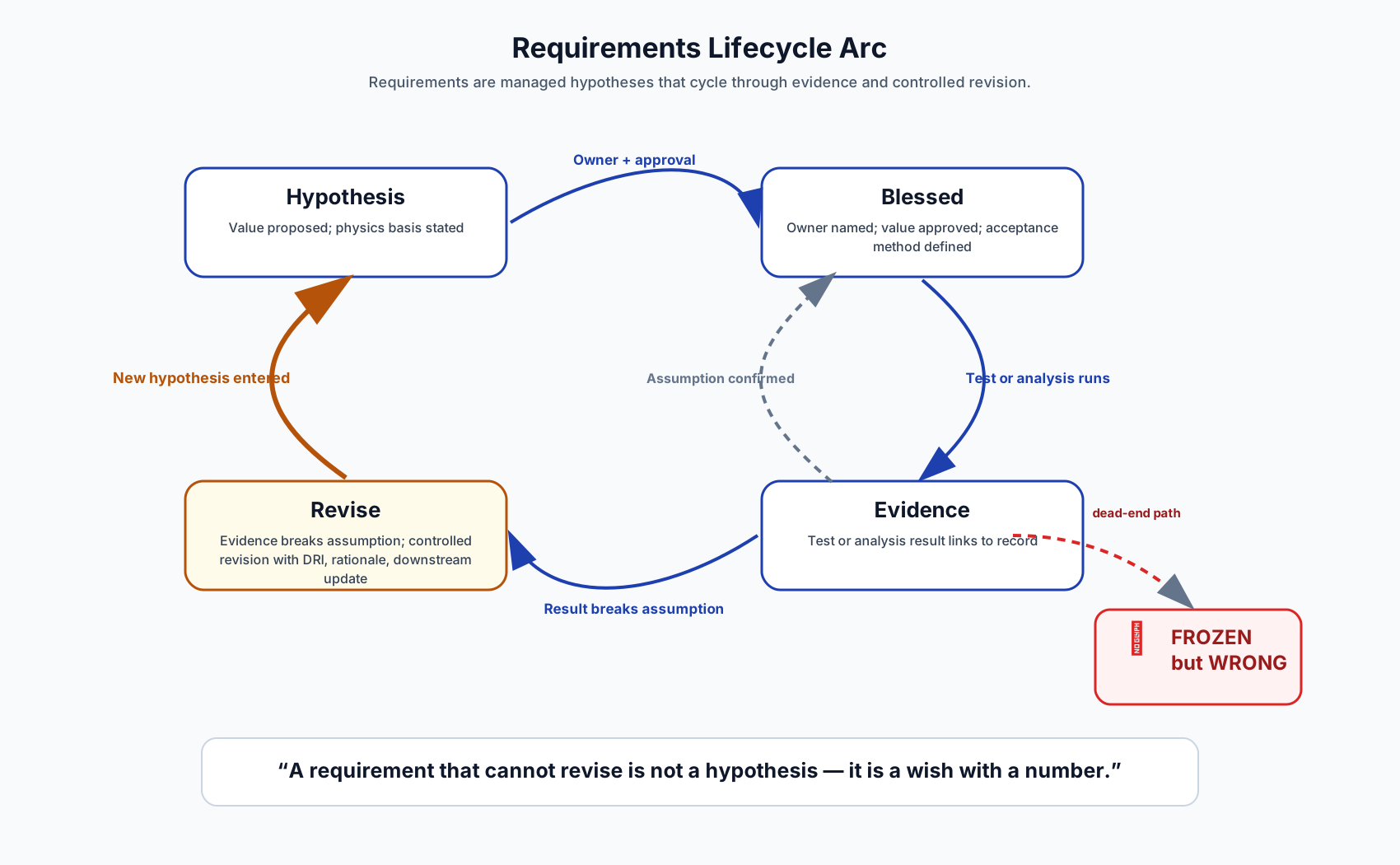
Each state requires an explicit move condition: Hypothesis advances to Bless on a named authority sign-off with stated confidence for the current phase. Bless advances to Evidence when the first data record is attached to the requirement ID. Evidence advances to Revise when data crosses a predeclared threshold or operating conditions change materially. Revise re-enters Bless once the revision record is complete — old value, new value, evidence source, rationale, approver, and date.
The requirement owner repeats this loop after each evidence update, gate review, or operating-condition change.
This loop makes changes legible in the log and mandatory for every downstream decision that consumes the value.
Frozen-but-wrong is worse than revised-with-evidence
Leads rightly fear uncontrolled churn in the requirement baseline. The opposite failure is also common: freezing wrong values in the requirement register to protect schedule optics.
A frozen-but-wrong requirement baseline causes:
- hidden divergence between design and test reality — the requirement log and the test record reference different values with no revision entry connecting them,
- late design turns — design is built to a known-wrong bound until a gate exception forces the change after commitment,
- supplier misalignment — supplier inspection criteria reference the frozen value, not the test-confirmed limit,
- and "surprise" gate failures — visible earlier in data, masked by a requirement record that stayed frozen.
The lead needs both controls in the requirement log: revision discipline stops uncontrolled churn, and evidence discipline stops the opposite failure — holding a known-wrong value to protect the appearance of a stable baseline.
The board thermal limit was set to 65 °C by the electrical engineering team — a conservative estimate intended to protect component lifetime across the product's operating range. It was not decomposed to the case temperature limits of the specific components on the board, and no scope note identified which operating scenario it applied to.
The full-load chamber test ran at full power and 40 °C ambient — the scenario defined for UL qualification — and measured the control board approaching 70 °C. The limit said 65 °C. The program ran three weeks of thermal management work: airflow changes, layout iterations, component placement. None of it was targeted, because the requirement had not been tied to the actual components at risk.
When the requirement owner pulled the 65 °C limit back to its basis, two questions surfaced: which components it was protecting, and which scenario it applied to. The answers changed the problem. The 65 °C estimate was a lifetime operating condition limit — it applied to sustained load in worst-case ambient across the product service life, not to a one-time UL qualification test at 40 °C. No component case temperature limit was being violated under the qualification test scenario. For the lifetime scenario, the question became which specific components were at risk and what their case temperature limits were — a decomposed set of requirements the 65 °C proxy had been standing in for.
Three weeks of whole-assembly thermal management work was redirected to targeted mitigation on the two components whose case temperatures were actually at risk under lifetime operating conditions. The target list had two components on it. The previous three weeks had addressed neither.
The fix was not a thermal redesign. It was the sentence that should have ridden alongside the number the day it was written: which scenario, which components. Two clauses, three weeks late.
Revision criteria (minimum)
Revise a requirement only when predeclared decision thresholds are met:
- evidence crosses a pre-defined threshold,
- operating conditions changed materially,
- supplier/process capability data invalidates prior assumption,
- a pending gate decision or design release depends on confirming or correcting the current value before commitment.
Each revision entry in the requirement log should include:
- old value, new value,
- evidence source,
- rationale,
- impact scope (design, test, cost, schedule),
- approver and date.
Acceptable implementations for the requirement lifecycle log include a gated product-data revision route when build truth must trace to an authoritative BOM, an issue-tracker type with gated fields for owner, evidence links, and revision trail when releases are routed from backlog records, a locked shared spreadsheet with named owners and protected history columns for early programs that still need fast iteration, or a controlled markdown log under version control when the team is small and repository-led. Whatever the home, the same row has to carry all of it: old value, new value, evidence source, rationale, impact scope, approver, and date.
If the revision row exists but the evidence source field is blank, the revision is not controlled — it is a number change with a timestamp. That is the tell.
Preventing moving-goalpost behavior
Teams resist revisions when the decision record looks arbitrary.
Prevent goalpost behavior by separating two written records:
- decision criteria (requirement ID, revision threshold, and decision owner — defined and locked in the revision memo before data arrives),
- decision outcome (revised value or reaffirmation — recorded after criteria are evaluated, with evidence source and approver).
If criteria stay stable in the decision record, revisions read as disciplined learning rather than political drift.
Weekly lifecycle review
For each active high-impact requirement ID, run a short weekly review:
- state check (Hypothesis/Bless/Evidence/Revise),
- evidence delta since last review,
- pending revision decisions and owners,
- downstream artifact update status.
The requirement owner should finish this review in minutes and publish one delta note, not run a half-day meeting.
Field test: If you cannot point at one requirement ID in your current program that revised in the last quarter with evidence in the log, an approver on record, and a downstream-update note, you are running on frozen-but-wrong values somewhere.
Controlled revisions depend on requirement values that were grounded in physical evidence in the first place — stacked-margin assumptions make every revision a negotiation rather than an evidence check.